
JUMO AQUIS 500 pH
Type 202560
Table of Contents
Jumo AQUIS 500 pH cannot be calibrated.
This could have a number of different reasons:
- If asymmetry occurs, the bridge between terminals 3 and 5 must be connected to terminal strip 2.
- The electrode cable has become damp. This can cause the high pressure electrode signal to be heavily loaded and thereby reduced by the contact resistances at the connector.
- The electrode is faulty. This may be caused by factors such as a broken electrode shaft or a dirty diaphragm. Even if KCL of the combination electrode is used up, JUMO AQUIS 500 can no longer be calibrated. Note: The electrode should not be stored for too long as the electrode will already age if it is not installed.
- The buffer solution is too old.
Can I get a demo version of the software to install JUMO AQUIS 500?
30-day trial version is available to test the installation software.
This means that all features of the installation software can be used without restrictions for 30 days after the first installation. Transfer of setting data and saving of setting file are automatically blocked after 30 days.
By entering the license number for the full version, the installer's features can be unlocked again without any time limit (even after 30 days).
The software can be downloaded from the JUMO website at
I cannot enter settings in the setup program. The background is completely gray. How can I change this?
First, a new document must be created (File → New). After this, you can choose whether you want to install the device hardware manually (user defined) or whether the software should automatically detect the device hardware online.
Can relays or analog outputs be retrofitted locally on the device itself?
The customer does not provide for modernization of the terminals.
After pressing the CAL key, a lock will appear behind the calibration type, at this point calibration cannot be carried out.
The calibration level can be accessed through the administrator level. The default password is 300. To start calibration via key CAL you must first activate your chosen calibration type at the administrator level under "Calib. Enable".
What is the difference between symmetrical and asymmetrical pH electrode connections?
A symmetrical connection can to a certain extent avoid measurement errors caused, for example, by a poorly insulated motor.
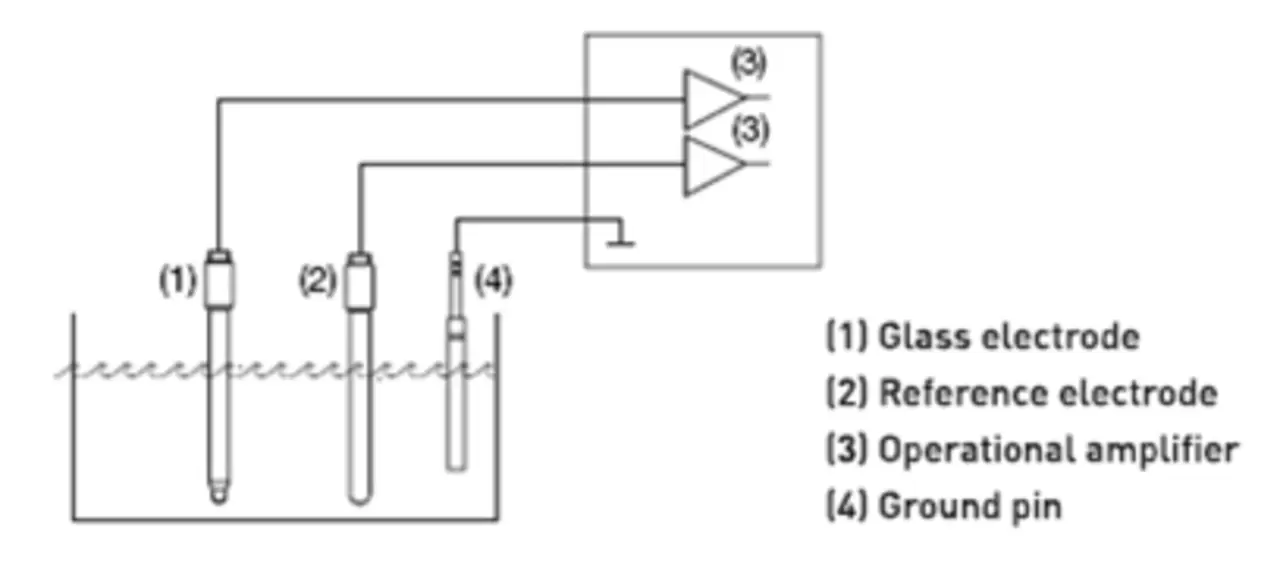
The difference lies in the connection between the glass and the reference electrode or combination electrode. Instead of a bridge from terminal 3 to 5 (asymmetrical connection), the liquid potential of the measuring medium must be connected to the transmitter via a ground pin. Nothing should be changed in the device configuration.
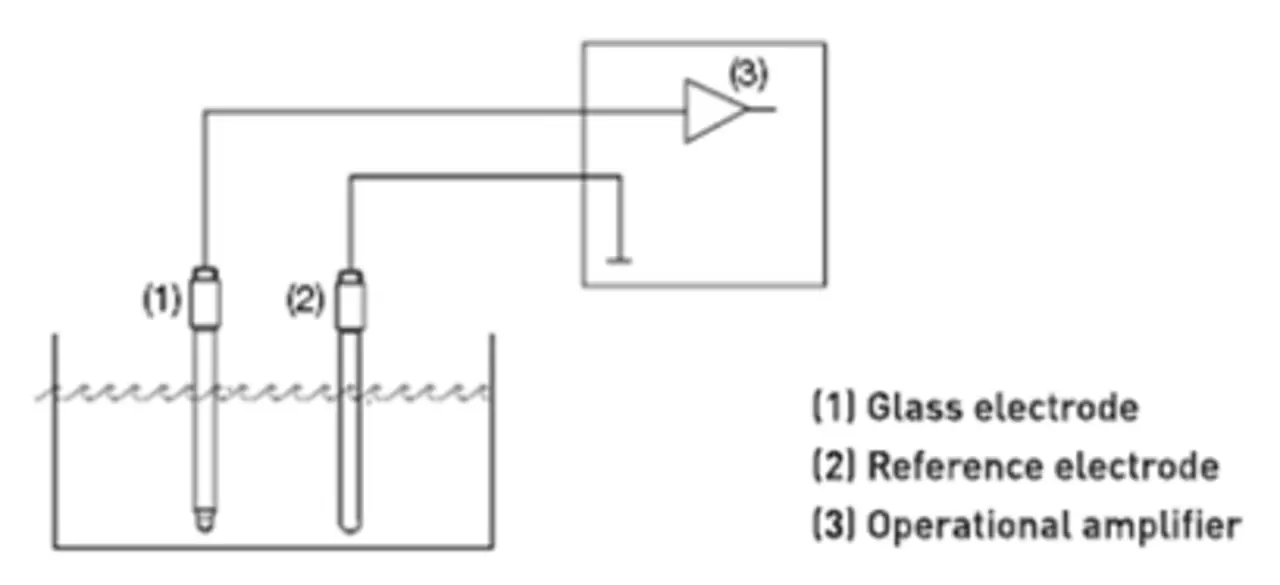
If the connection is asymmetrical, with the glass electrode connected to a high impedance transmitter and the reference electrode connected to a low impedance transmitter, this difference may result in incorrect measurements due to potential shifts.
If the connection is symmetrical, then the glass and reference electrodes are connected to the device electronics through an operational amplifier, and both op-amps register a potential shift, as a result of which the voltage difference remains unchanged.
If the connection is symmetrical, then the glass and reference electrodes are connected to the device electronics through an operational amplifier, and both op-amps register a potential shift, as a result of which the voltage difference remains unchanged.
How can a device be reset to its default data state?
JUMO AQUIS 500 can be reset in JUMO default settings at the administrator level. To access, enter the number 8192 when prompted for the code.
Then JUMO AQUIS 500 performs a reset. This process takes approximately 10 seconds.
How to find out the software version JUMO AQUIS 500?
To find out the device software version, press the “PGM” and “Up arrow” keys simultaneously.
Where JUMO AQUIS 500 can be switched from pH to redox measurement?
This parameter can be entered in the "Basic Settings" section.
Various operating mode options are available here:
- Standard pH electrode
- Antimonium pH electrode
- pH electrode
- Redox measurement
- Ammonium measurement
After changing the operating mode, the device asks whether it should be restarted.
If there is no response, the old settings are saved. After initialization, the basic settings corresponding to the selected operating mode are applied.
Our services for you