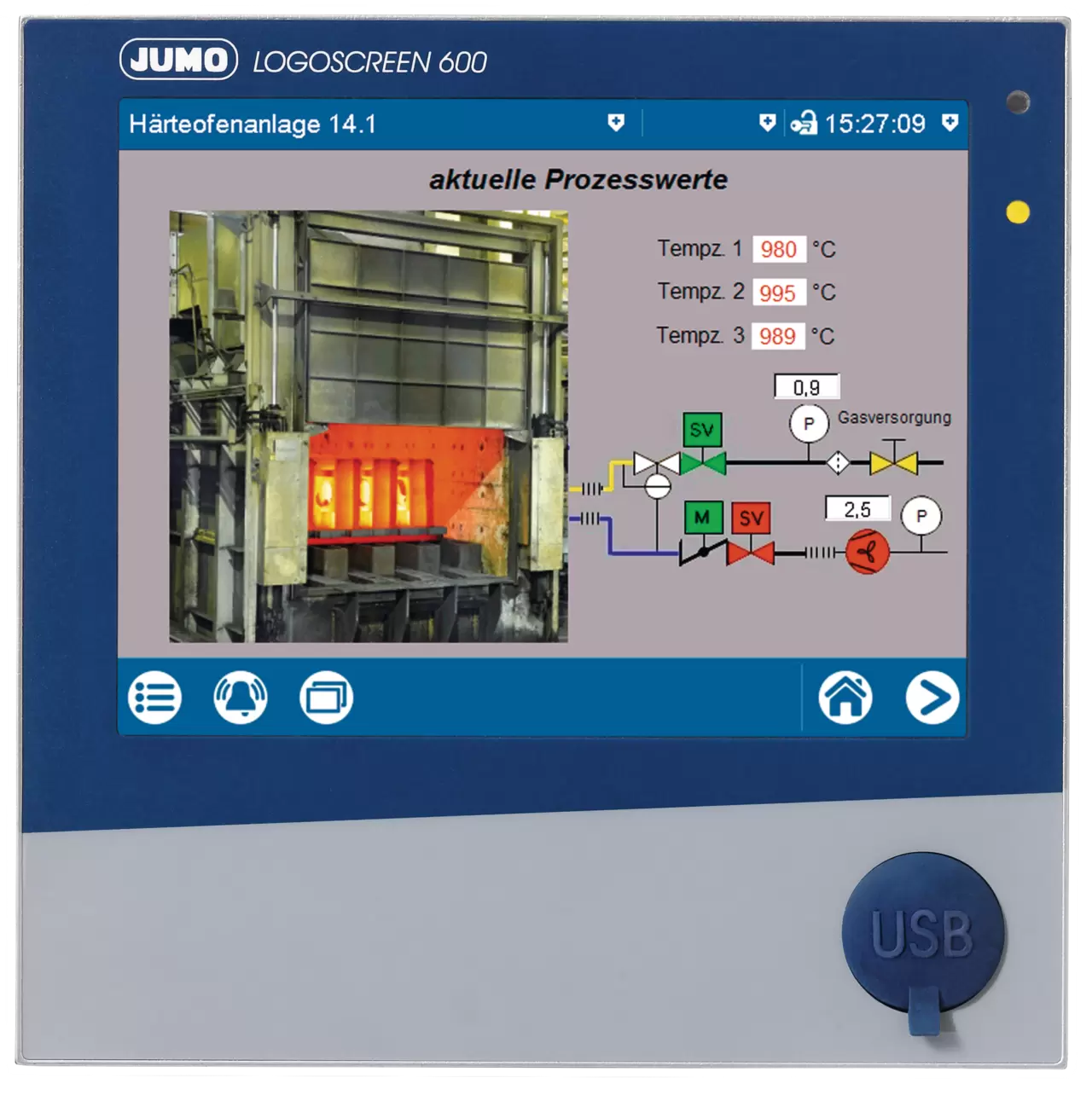
Paperless recorder with touchscreen
Find out more about the benefits and relevant technical data of the JUMO LOGOSCREEN 600
Device information
The manufacturing facilities and laboratories described in this section belong to JUMO. Contact IMAGO for equipment selection and supply in Kazakhstan.
Find out more about the benefits and relevant technical data of the JUMO LOGOSCREEN 600
Device informationThe time interval displayed on the JUMO LOGOSCREEN 500 cf depends on the configured recording interval.
Different storage cycles can be programmed for the three possible operating modes: normal operation, timed operation and event operation. This allows measured values to be stored more frequently, for example when a limit value is exceeded or within a specific time window, providing higher resolution on the time axis.
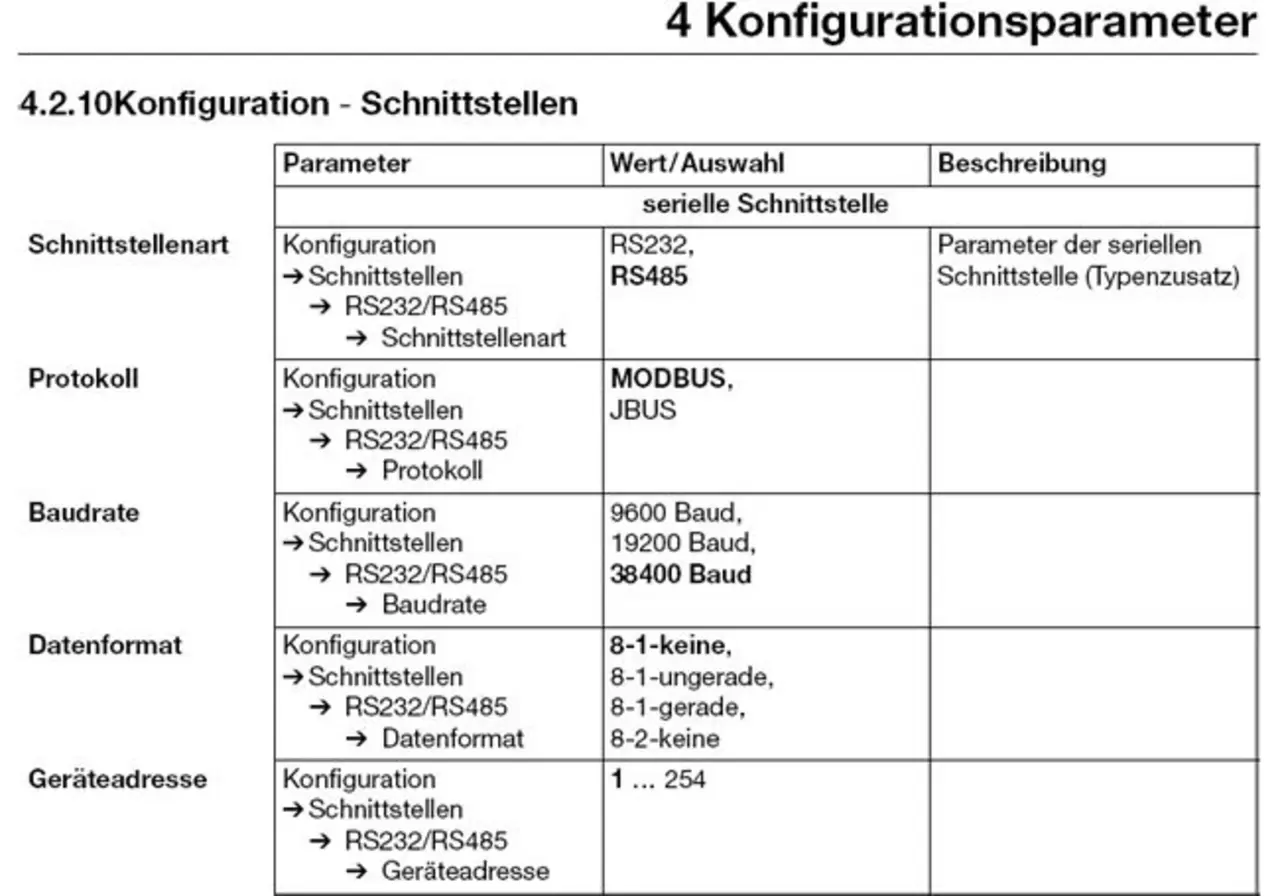
Do the interface parameters (protocol, baud rate, data format, device address, etc.) in the JUMO PCC communication server software match the settings in the JUMO LOGOSCREEN 500 cf?
Where applicable, also see the operating instructionsChapter 4.2.10 (Configuration — Interface).
Is the connection correct for the interface type (RS232/RS485) and wiring?
For RS485, an additional external interface converter to RS232 or USB is usually required for connection to a PC.
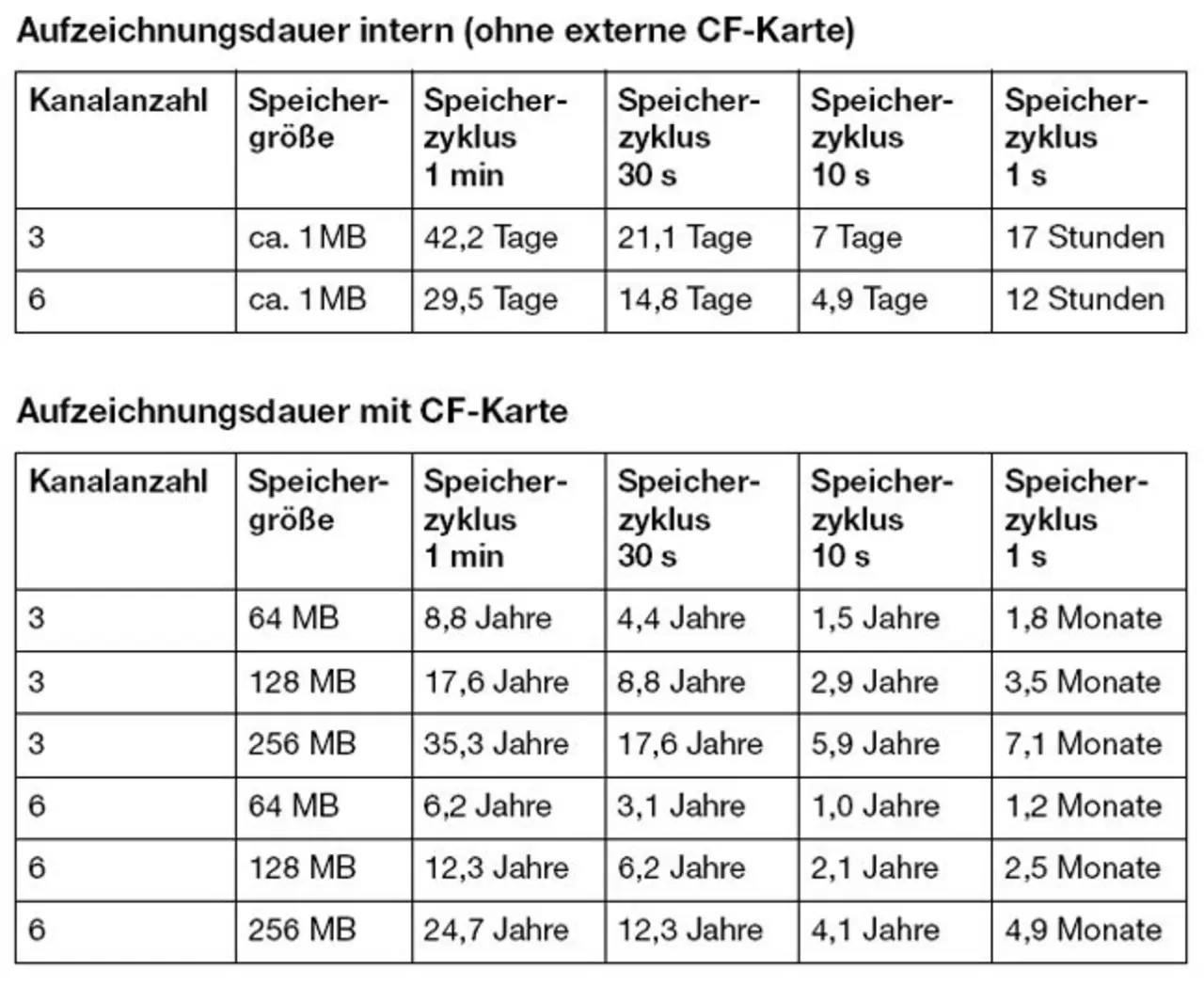
The recording time depends on several factors:
In Chapter 2.8 of these operating instructions reference values are provided in a table.
The internal memory of the JUMO LOGOSCREEN 500 cf operates as a ring buffer. After data is transferred to the external CF card, the recorder does not automatically overwrite it.
If the maximum recording time is exceeded, the old data remains on the CF card while the internal memory contains the most recent data, resulting in a loss of measured data for the period in between.
Industrial-grade CompactFlash cards with a maximum capacity of 2 GB can be used.
Format: FAT or FAT16
For a high level of data security, the manufacturer recommends using only the CF cards offered by JUMO as accessories for this recorder. These CF cards have been tested with the LOGOSCREEN 500 cf and proven in practice.
1. Activating integrators and counters as well as the mathematics and logic module.
These software options can be activated subsequently using the configuration software or directly on the device using its buttons.
1.1 Activation procedure using the device buttons:
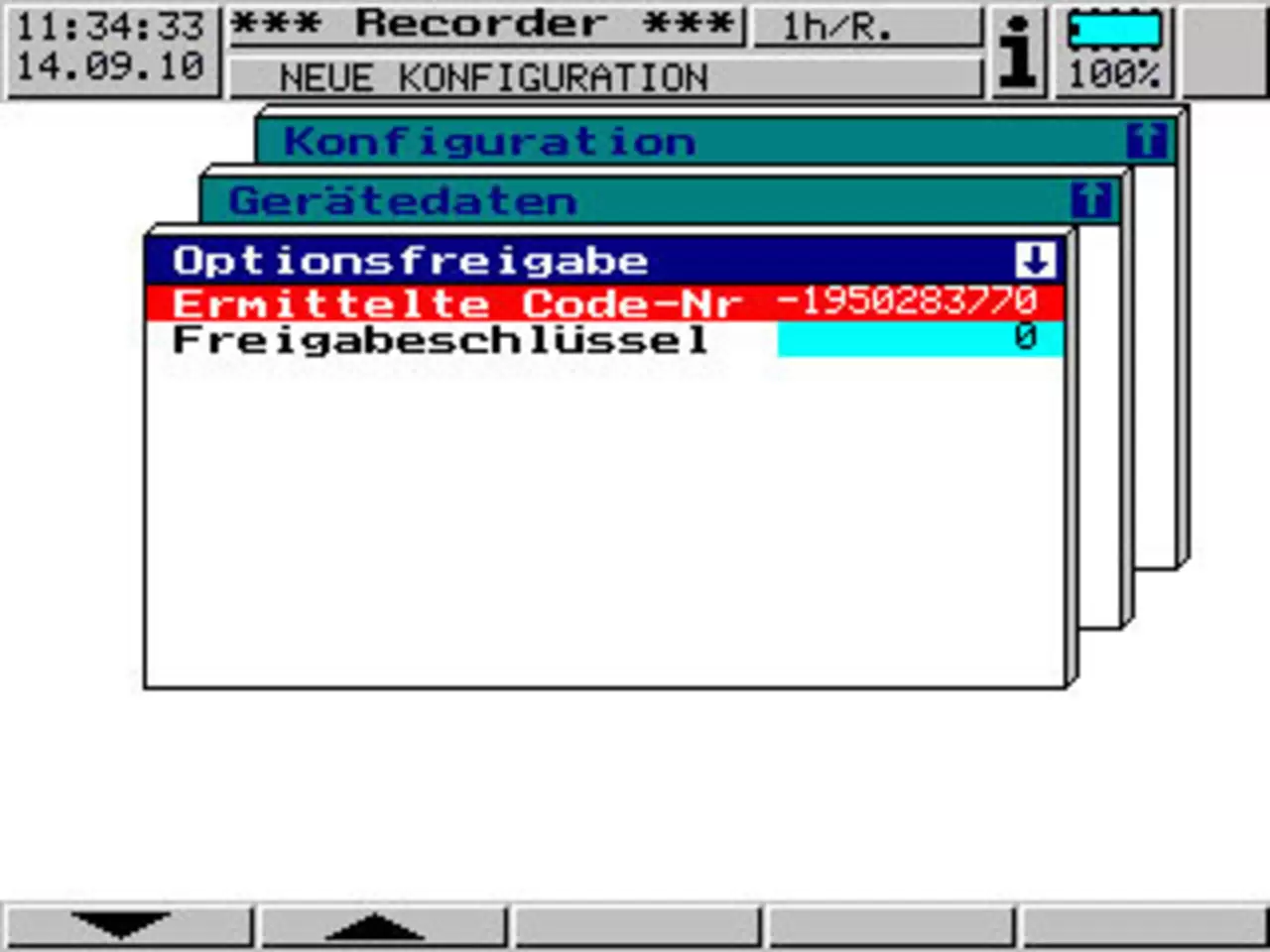
First, read the code number from the LOGOSCREEN 500cf. To do this, open the following menu:
Configuration level — Device data — Release option — Determine ID.
The code displayed here, including any sign, is sent to JUMO by telephone, fax or email.
JUMO generates a device-specific release key from this ID.
To activate the option, enter this release key in the corresponding field on the device. The option is then immediately available and can be configured and used to suit the application.
Upgrading from three to six analogue inputs
If required, LOGOSCREEN 500cf devices supplied with three analogue inputs can be upgraded to six analogue inputs by JUMO service personnel.
Retrofitting 4 binary inputs, 3 relays and an RS 232/485 serial interface (Modbus, J-Bus)
If required, JUMO service personnel can also retrofit extra code 261, comprising 4 binary inputs, 3 output relays and an RS232/485 serial interface.
A fault is present, with details shown in the device information window.
(for example, "Battery empty")
The device information window also displays general device information, such as the software version number and installed hardware.
See also: Operating instructions, Chapter 3.7.
On request, a test report 2.2 or inspection certificate 3.1.B can be issued for the LOGOSCREEN 500 cf. For this purpose, send the device to JUMO together with a list specifying the measurement points to be tested.
In addition to calibrating individual paperless recorders, complete temperature measurement chains can be calibrated at the user's site or at the JUMO factory. JUMO has its own DKD laboratory at its headquarters in Germany for this purpose.
The LOGOSCREEN 500 cf can record up to 6 analogue signals in parallel, including on devices with the mathematics option enabled.
On the version with 3 analogue inputs and the mathematics module enabled, for example, the progression of 3 variables calculated in the mathematics module can be recorded in addition to the three analogue inputs.
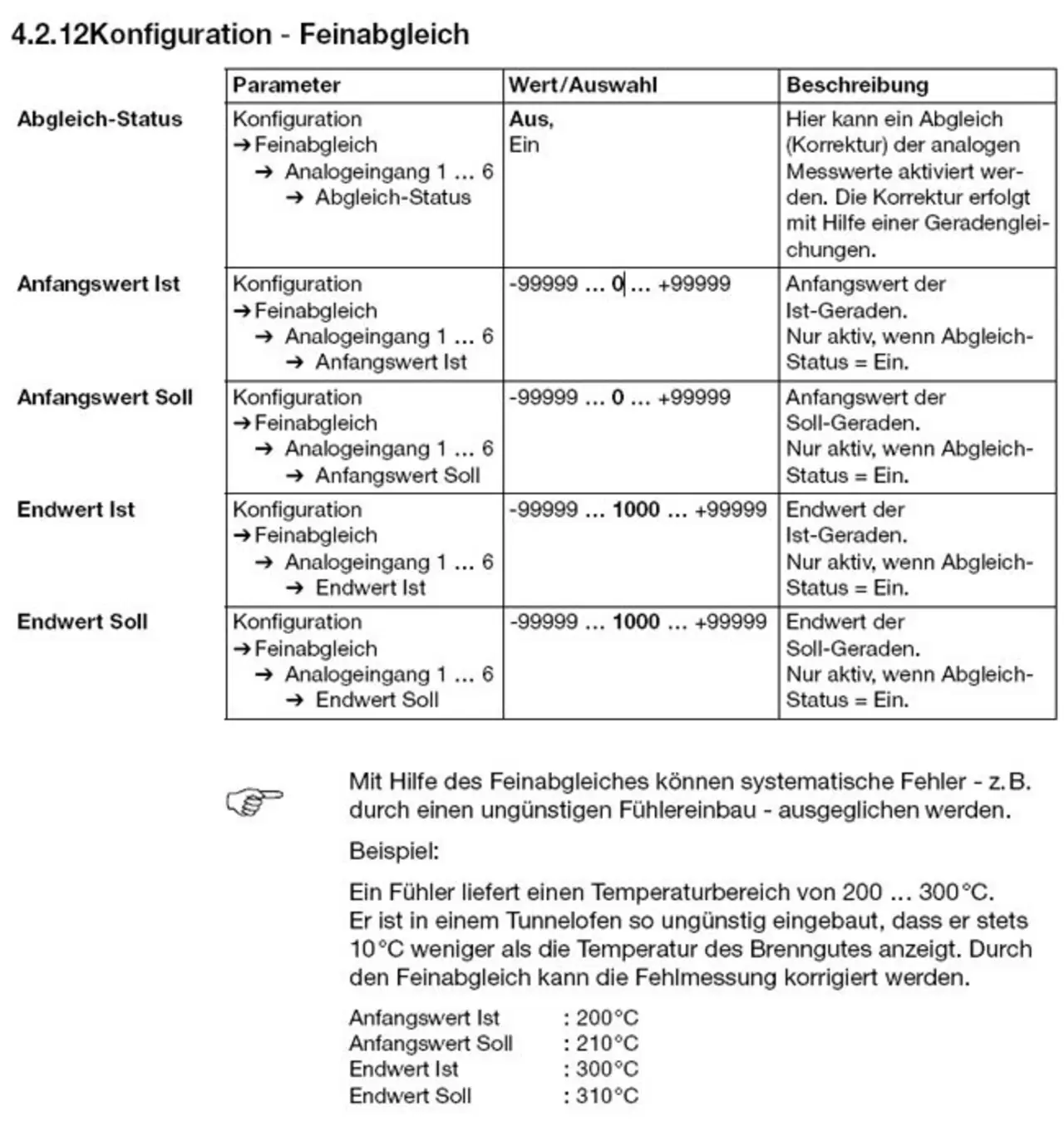
Each analogue input can be adjusted to reference signals using the device's configuration level and the Fine adjustment submenu. To prevent inadvertent overwriting or transfer of this device-specific fine adjustment, it must be performed exclusively using the buttons directly on the recorder.
Chapter 4.2.11 of the operating instructions describes the exact procedure.
For all three software products:
The current version is available to download free of charge from the JUMO website. A purchased licence number is required to use the full version. An existing licence number remains valid for updates.
PCA3000 can be used without a licence number to display archived PCA data, for example when measured value data is provided to customers or authorities.
Undocumented parameters allow further adjustment of device functions to specific requirements. However, to avoid errors, these parameters should only be changed after consultation with JUMO and in accordance with explicit instructions.
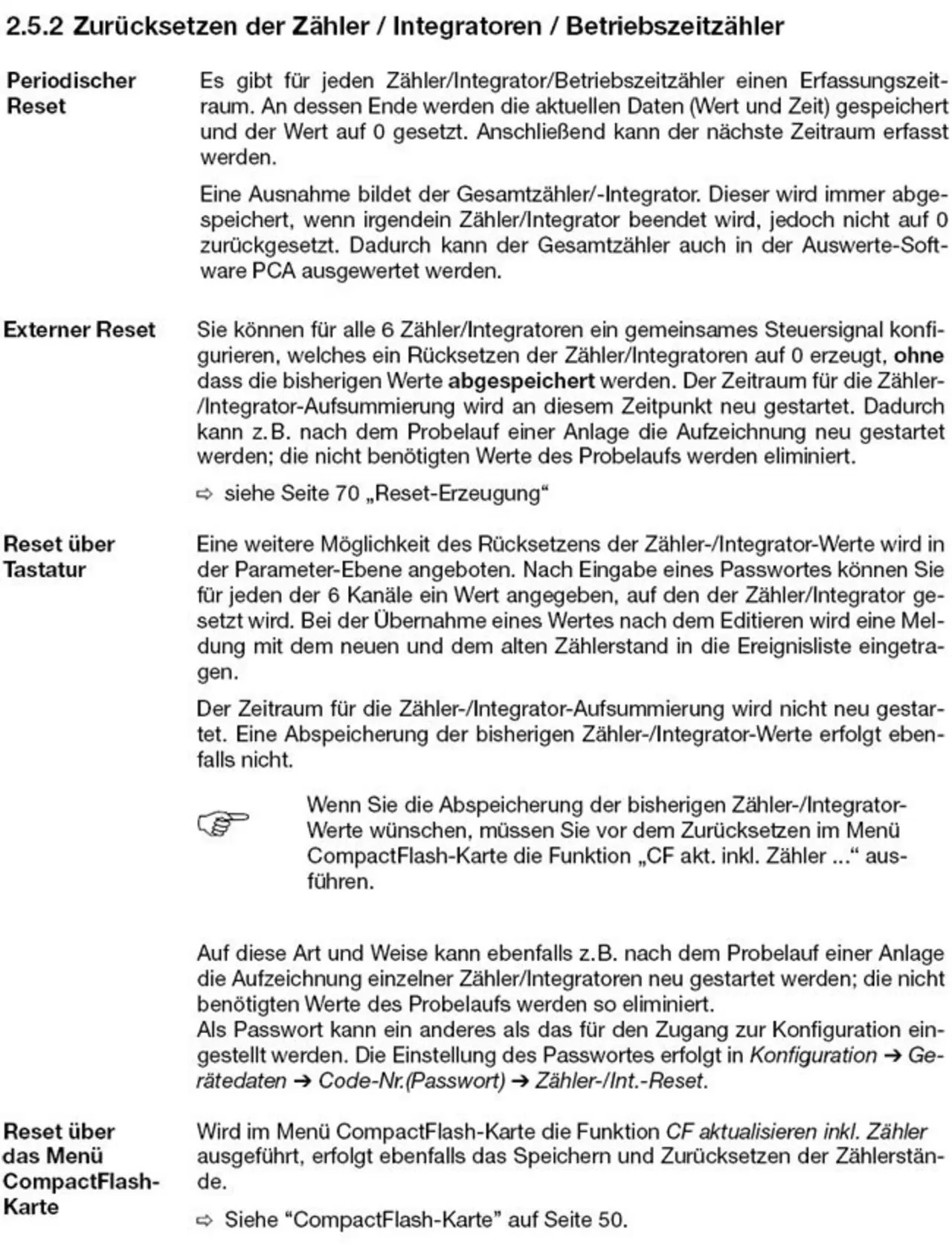
Counters and integrators can be preset or reset using the Counter/Int.-Reset menu at the parameter level directly on the LOGOSCREEN 500 cf.
New values can simply be specified there for individual counters and integrators, and the intervention is documented in the event list.
Further information is provided in Chapter 2.5.2 of the operating instructions.
If two lines or two columns appear for an input signal on the recorder or during evaluation in PCA3000, the reason is as follows:
The factory setting under Recording — Normal operation — Stored values selects peak values, which determine and store the Min and Max values within each storage cycle.
This peak value recording is particularly suitable for applications where the following applies:
For many standard applications, JUMO recommends the following under Storage values:
JUMO LOGOSCREEN 500 cf then calculates the average of the measured values acquired during the memory cycle and stores only one value per cycle, so that only one line is displayed per channel.